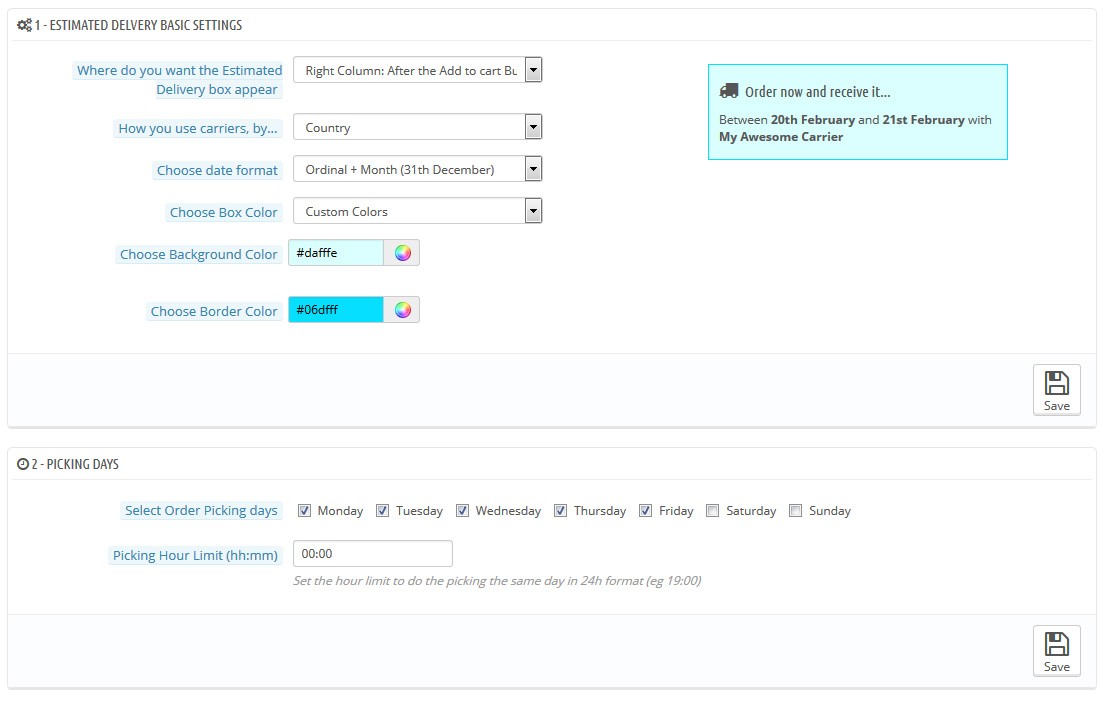
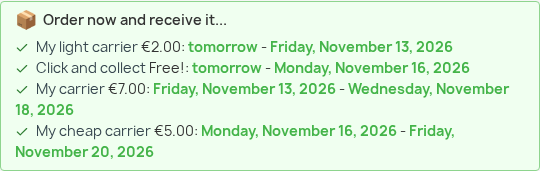
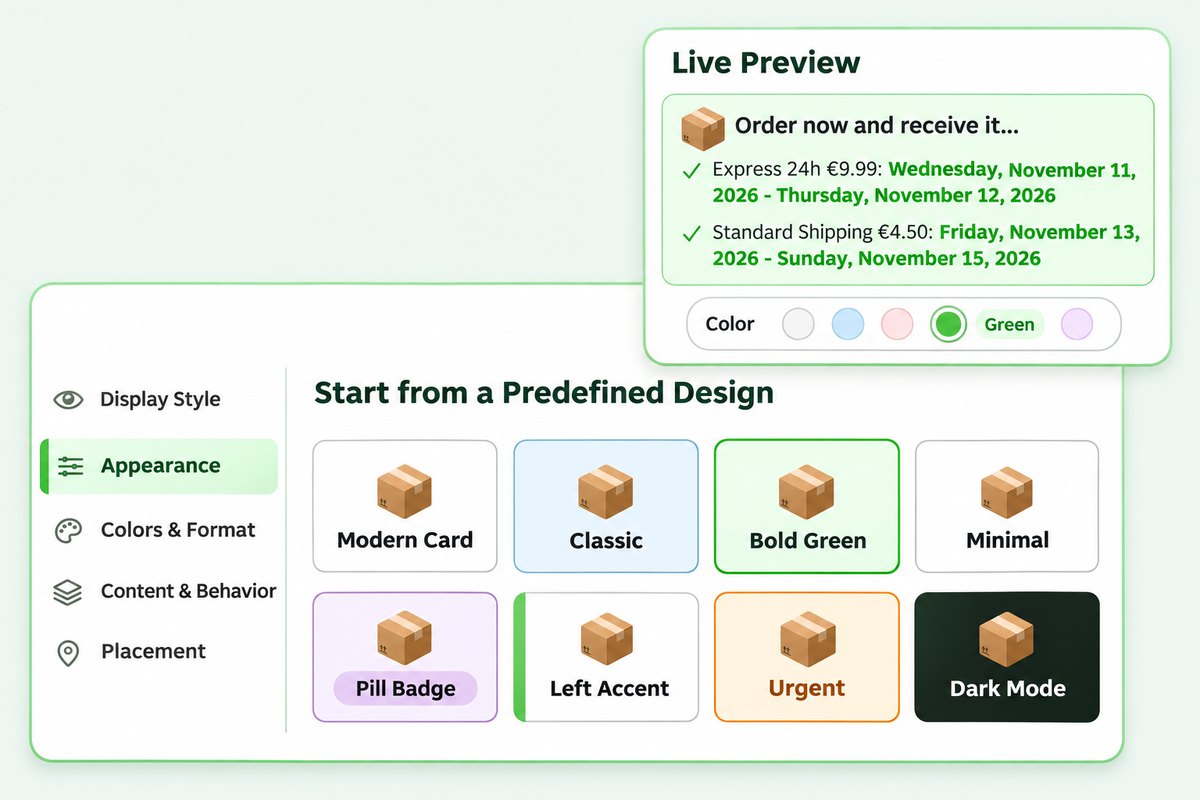
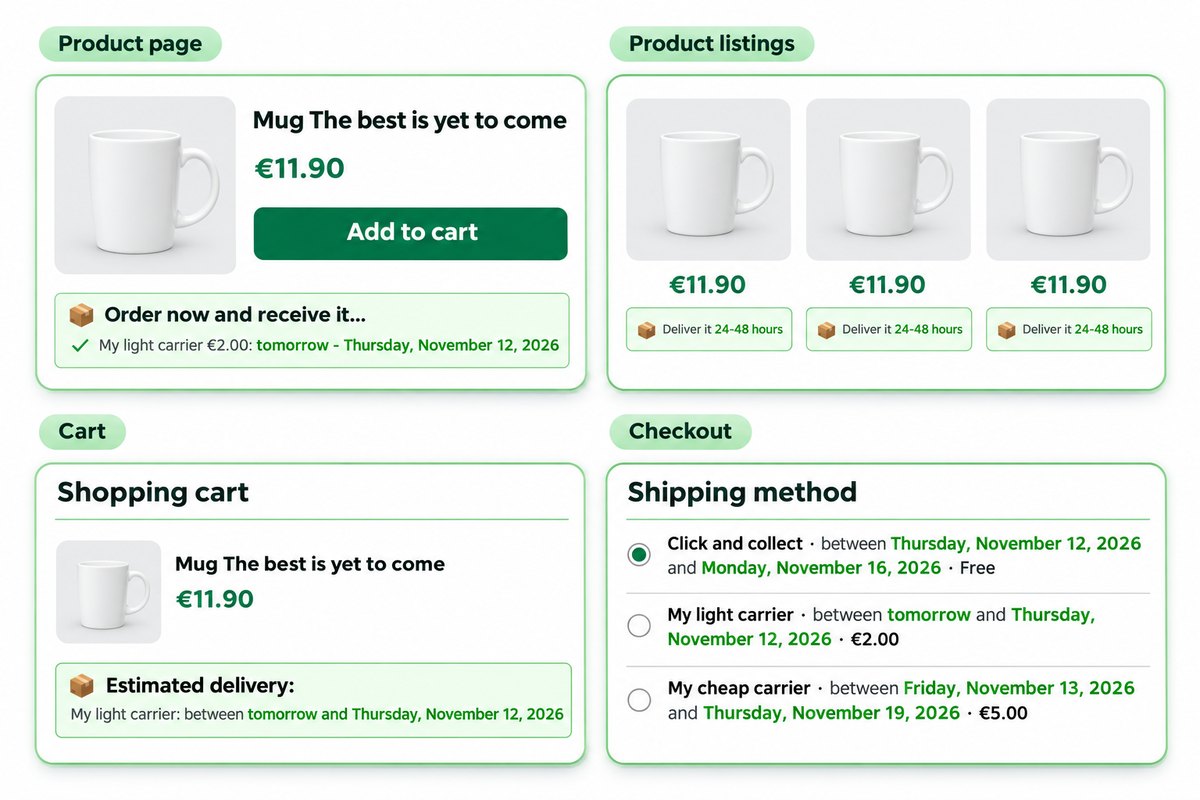
Screenshots

Video

See it in action

A quick tour of what the module does and how you set it up.

Choose your licence

Estimated Delivery V3 for Prestashop

Total

One-off payment. One year of updates, or a lifetime licence.
Try the live demo

A real shop with the module installed. Opens in a new tab.

Description

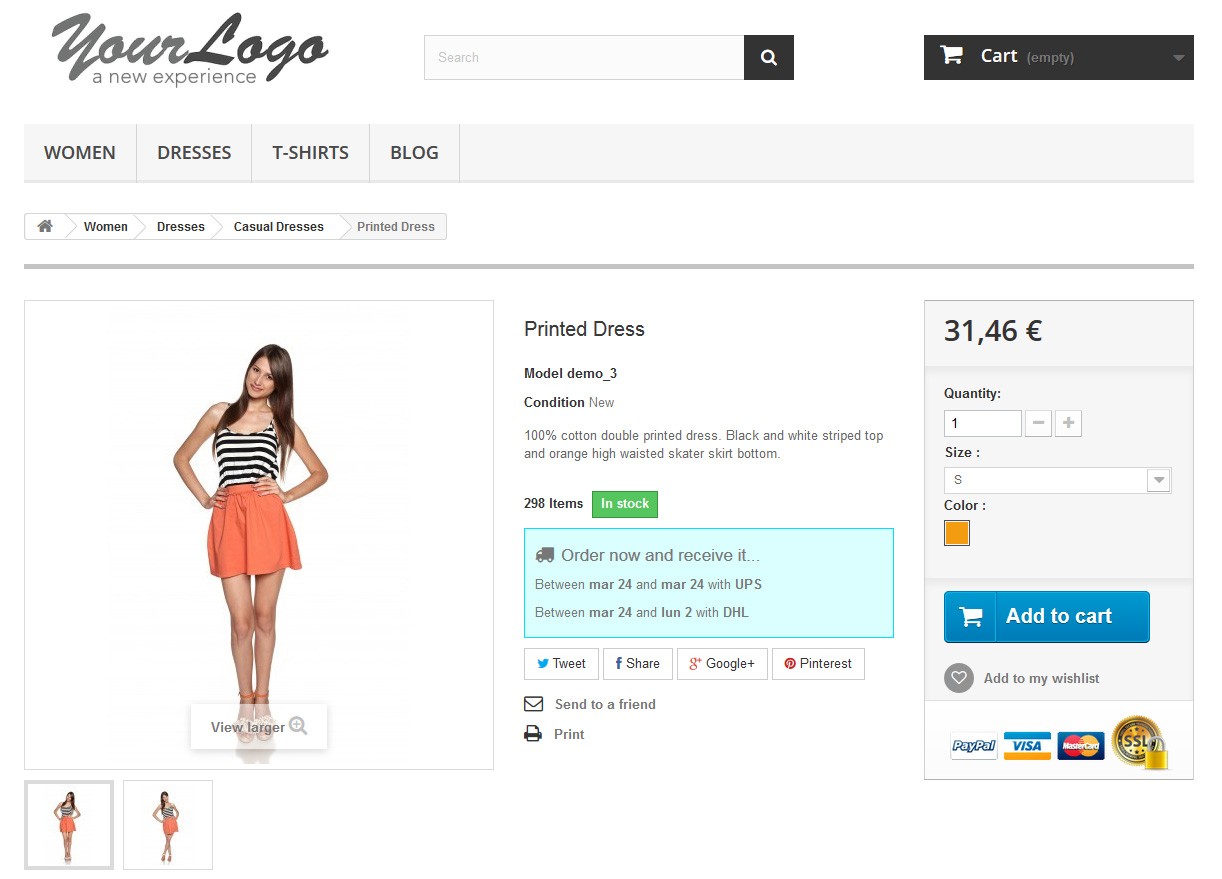
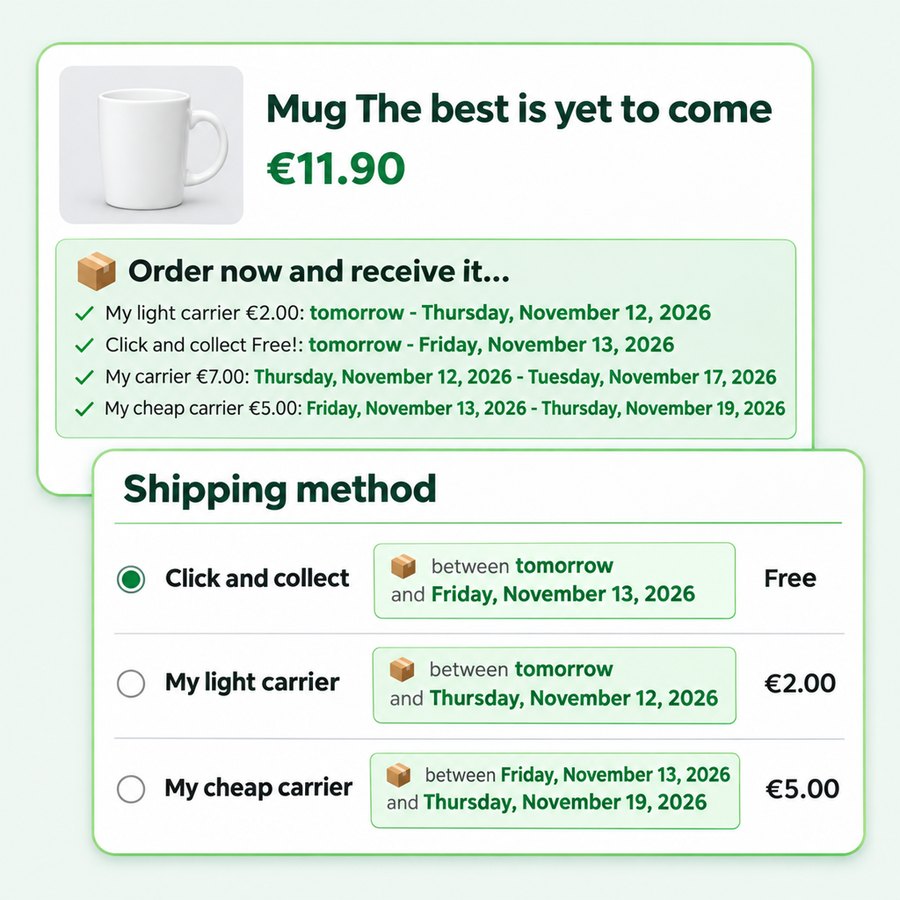
A must-have module. Let your customers know the estimated delivery in the product page, in the order process or even in the order emails.

PrestaShop module · Smart Modules

Estimated Delivery Date for PrestaShop – Accurate Delivery Dates for Every Product, Carrier and Order

Tell every customer when their order arrives. Before they ask.

Estimated Delivery shows a real delivery date for every product and every carrier, from the product page to the order email. It counts your preparation days, your cut-off times, your holidays and your carriers' delivery days, so the date your customer reads is a date you can keep.

* Symbolic representation of the module screens, simplified for easier understanding.

“When will it arrive?” is the last question before buying

Customers want to know when they will get what they buy. If the shop does not say, they leave to look elsewhere, or they buy and then write to ask. A fixed “2–3 days” in the footer does not help either: it is wrong on Friday afternoon, on a holiday weekend, and for a product that is out of stock.

Estimated Delivery brings three things together:

Your calendar

The days you prepare orders, the time each carrier picks them up, your holidays and your suppliers' closures.

Your catalogue

Stock, pre-orders, restock dates, products made to order, and the extra days each product, category, supplier or brand needs.

Your message

Where the date appears, what it says and how it looks, in every language of your shop.

The result: every visitor sees the date that applies to them, for the product they are looking at, with the carrier they will choose.

How it works, in four steps

1

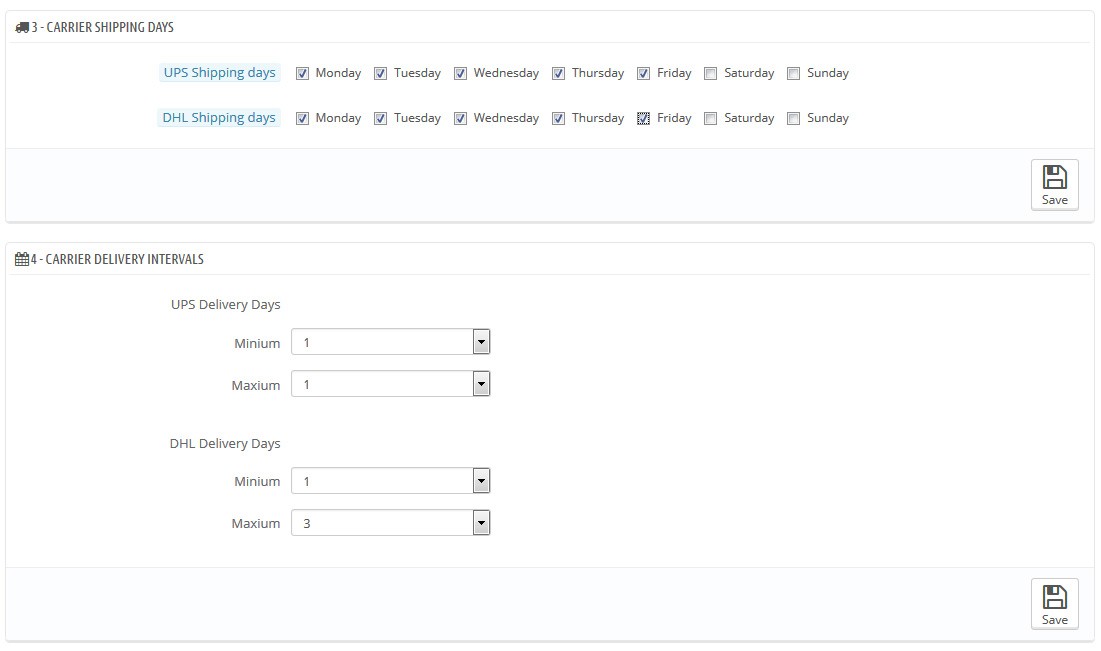
Set up your carriers

Delivery days, minimum and maximum transit time, and the cut-off time for each weekday.

2

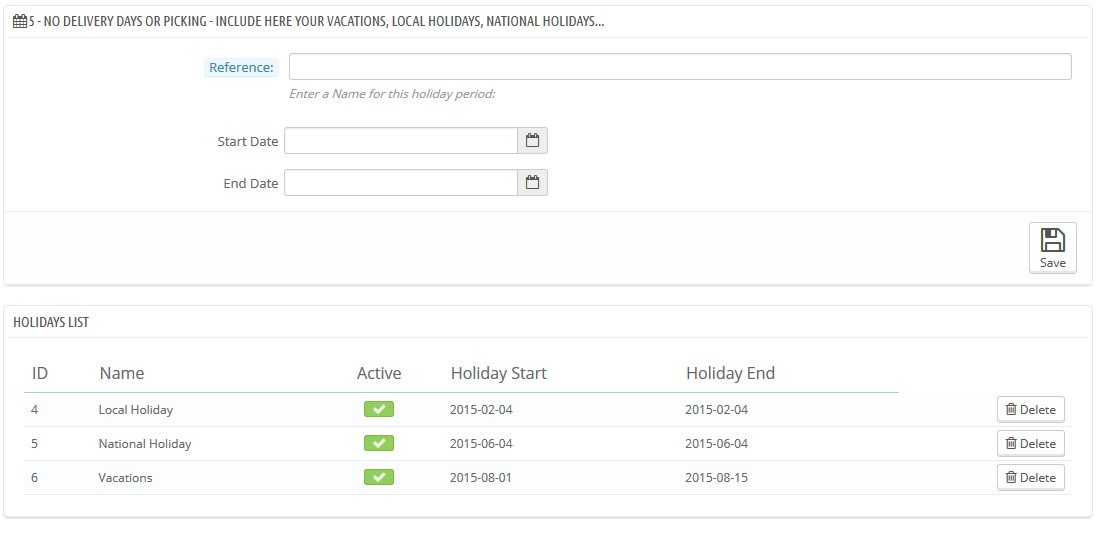
Add your calendar

Preparation days, holidays and supplier closures. A setup checklist on the dashboard walks you through it.

3

Choose how it looks

One of 5 display modes or your own message, a design preset, colours and an icon, with a live preview.

4

Forget about it

Every product, cart and order gets its date, recalculated automatically when you change a setting.

What makes it different

Hover over (or tap) each card.

Two clocks, not one

Preparation and delivery, counted apart.

Picking days + carrier days

An order placed on Friday after the cut-off is prepared on Monday and delivered on the carrier's next working day. Holidays can stop preparation, delivery or both.

A countdown that is true

“Order within 2 h 15 min”.

Cut-off per weekday

Each carrier has up to 7 cut-off times, one per day. The countdown runs to the next real one, and switches to the following day when it passes.

Late? They hear it from you

One email, never two.

Delayed Delivery Warning

You get a daily summary of overdue orders; the customer gets one polite email about the delay, logged so it is never sent twice.

Four levels of extra days

From one combination to the whole shop.

Combination, product, category / supplier / brand, global

Each product takes the most specific value, and the product's Estimated Delivery tab in the back office shows where every day comes from.

Show the date your way

Five display modes and a fully custom message. Each card shows what your customer would read.

Real captures: PrestaShop 8.1 with the demo carriers, Wednesday 11 November 2026, around 10:00.

All Carriers

Every carrier with its own date, one per line. Ideal when carriers differ a lot in speed.

Countdown

Urgency that is real: the time left to order for the next shipment, and the date it will arrive.

Picking Limit

The time limit to order today, tomorrow or on the next picking day, with the delivery date it gives.

Shipping Day

When the order leaves your warehouse. Useful for products with customization or long preparations.

Double Display

Two carriers side by side, by default the fastest and the cheapest, each with its price and date.

Custom

Your own sentence, with live dates and conditions. When none of the modes says it the way you want.

{if_tomorrow}Order now and get it tomorrow with {carrier_name}!{else_tomorrow}Delivery: {delivery_range} with {carrier_name}{/if_tomorrow}

Write exactly the message you want

0
variables
0
conditional blocks
0
ready-made templates
  • Variables for the carrier, the minimum and maximum date, the range, the shipping and picking day, the time left, the countdown, the price and more.
  • Conditional blocks show one text when delivery is today or tomorrow, when the order still ships today or when the countdown is running, and another text when it is not.
  • Templates in five groups (basic, urgency, carrier, detailed, conditional), so you never start from a blank field.
  • Every language: one message per language; applying a template fills in all the active languages at once.
  • Special messages for pre-orders, availability dates, virtual and customized products, products without a defined delivery and products that cannot be bought.
  • “Today” and “tomorrow” instead of a date when delivery is close, or always the date if you prefer.

Custom message

{if_tomorrow}Order now and get it tomorrow with {carrier_name}!
{else_tomorrow}Delivery: {delivery_range} with {carrier_name}
{/if_tomorrow}

If it arrives tomorrow

Any other day

Your shop's look, in a few clicks

The Display Builder sets the look of the block: 22 design presets (Modern Card, Minimal, Pill Badge, Dark Mode…), 10 colour presets or your own colours, borders, corners, shadow, spacing and text size. The date, the countdown, the carrier and the price each have their own colour and bold, italic or underline.

Want the shipping cost too? Show the carrier's estimated price next to the date on the product page (beta: it depends on how your shipping-cost modules calculate prices).

Pick one of 33 line icons or 20 emoji and symbols, or upload your own SVG. The module can read your theme's colours and suggest a matching palette, and every change shows up in the live preview before you save.

* Symbolic representation of the module screens, simplified for easier understanding.

Everywhere your customer looks

  • Product page: in the theme's usual places, or before, inside or after any element you pick with a CSS selector. It updates when the customer changes the combination or the quantity.
  • Product listings (beta): home, categories, search, brands, suppliers, best sales, new products and price drops.
  • Cart: the date of the whole order, of each product line and in the add-to-cart window. The date per line is built into Hummingbird; classic themes need one hook in the cart template.
  • Checkout: after the carrier list or next to each carrier, and at the payment step when you use payment method or voucher days.
  • After the order: confirmation page, order history, order emails, and optionally the invoice and the delivery slip.
  • PrestaShop 9 with Hummingbird: a date on each cart line and inside the quick view, with no theme editing.
  • Page builders and AMP: PrettyBlocks blocks for the product and the cart, and AMP product pages.

* Symbolic representation of the module screens, simplified for easier understanding.

Real shops, real rules

Six common cases, each with the setting that solves it.

The 16:00 cut-off

Orders placed before the cut-off are prepared today; the rest, on the next picking day. On Friday afternoon, that is Monday.

  Carriers › Picking Schedule › cut-off per weekday

Made to order

Furniture, prints, engraved gifts: the date includes the days you need to make the product.

  Date Modifiers › Customization Days, per category or product

Out of stock, still for sale

Instead of hiding the date, show a later one: a fixed number of days, a range, or the product's restock date.

  Date Modifiers › Out of Stock Days, or the product's availability date

Pre-orders

A product that launches next month shows a date counted from its launch day, not tomorrow's delivery.

  Product › Estimated Delivery tab › release date

Dropshipping and suppliers on holiday

When a supplier closes for August, only their products move. The rest of the catalogue is untouched.

  Holidays › Supplier Closures

Bank transfers

Payment takes two days to clear? The date at checkout adds them as soon as the customer picks bank transfer, without reloading the page.

  Date Modifiers › Payment Method Days

The date follows the order

Saved with the order

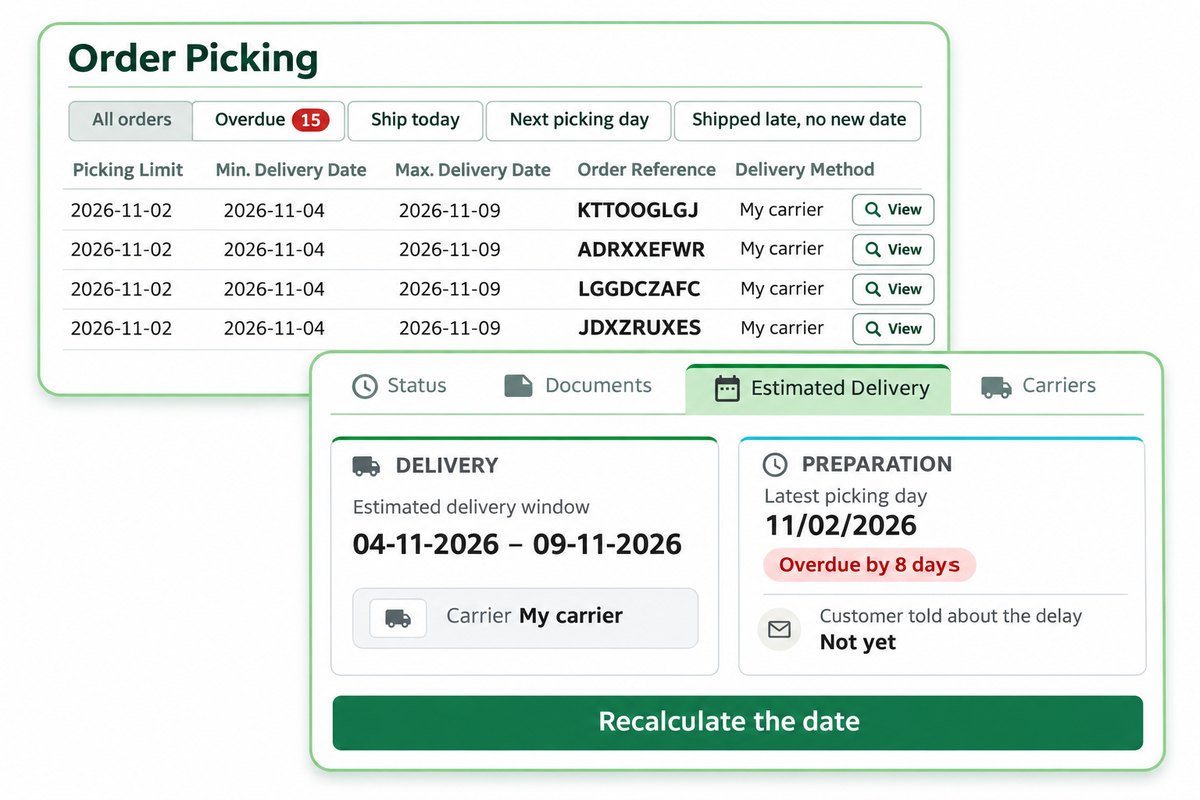
Each order keeps its dates. The order page shows them next to the preparation status: on schedule, ships soon, must ship today or overdue.

Recalculate and tell the customer

Up to four ways to work out a new date, and the new one can be emailed to the customer in one click.

Order Picking list

Every order with its picking limit, and quick filters: overdue, ship today, next picking day, shipped late without a new date.

In every email

9 email variables put the dates in any order email template, and a checker tells you which templates already include them. Emails sent by other modules can carry them too. A delivery markup tag that Gmail can read is in beta.

* Symbolic representation of the module screens, simplified for easier understanding.

Delayed Delivery Warning · optional

When an order runs late, you know first

Delayed Delivery Warning is an optional tool included in the module. It is off by default: switch it on when you want it, and choose which warnings are sent.

Daily summary

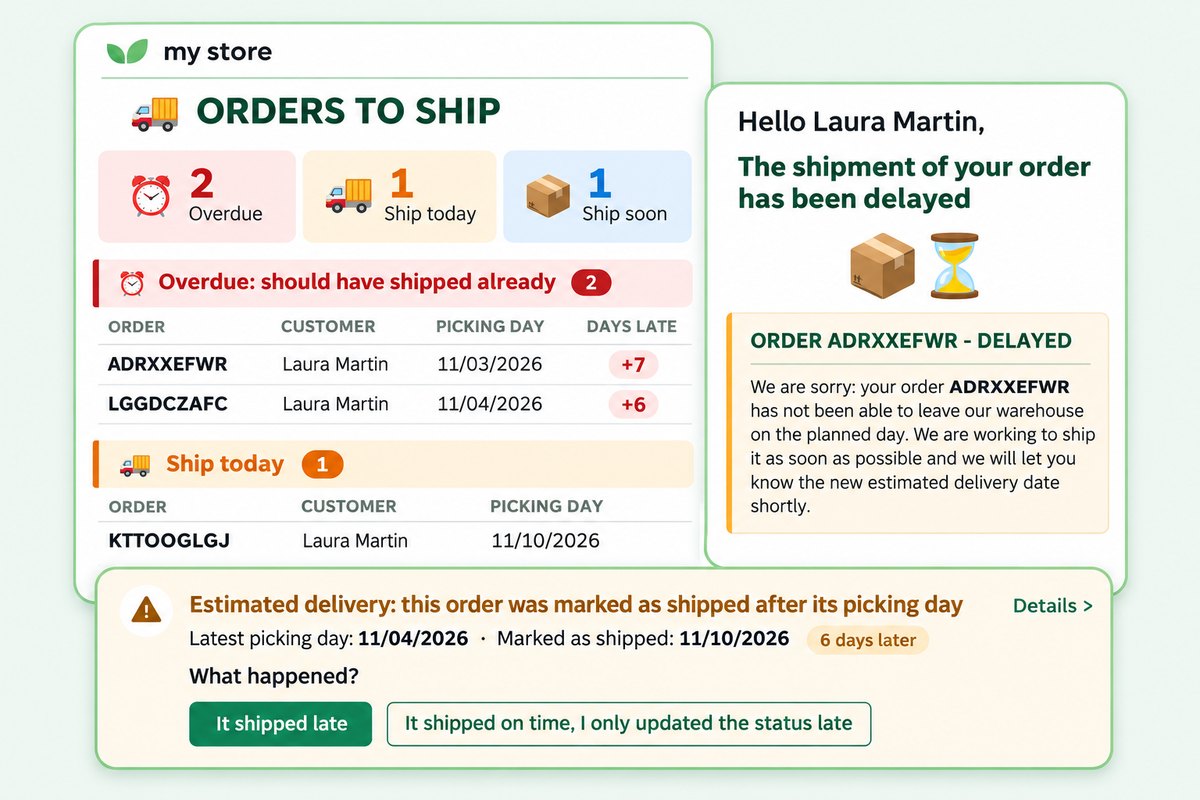
One email per run with the orders that are overdue, must ship today, ship soon or shipped late.

One email to the customer

Polite, in their language, after the grace days you choose. Never sent twice for the same order.

Counters in the back office

Overdue and ship-today counters above the orders list, an optional widget on the PrestaShop dashboard, and an alert at the top of a late order's page.

Late shipments

When an order leaves after its day, the module asks you what happened, sends the new date by itself, or does nothing: you choose.

Simulation and test mode

See what would be sent on any date, and send every email to a test address before switching it on.

Dates are estimates calculated from your settings and your carriers' usual times. The module does not track parcels and cannot prevent carrier delays.

* Symbolic representation of the module screens, simplified for easier understanding.

Fast pages, checked for you

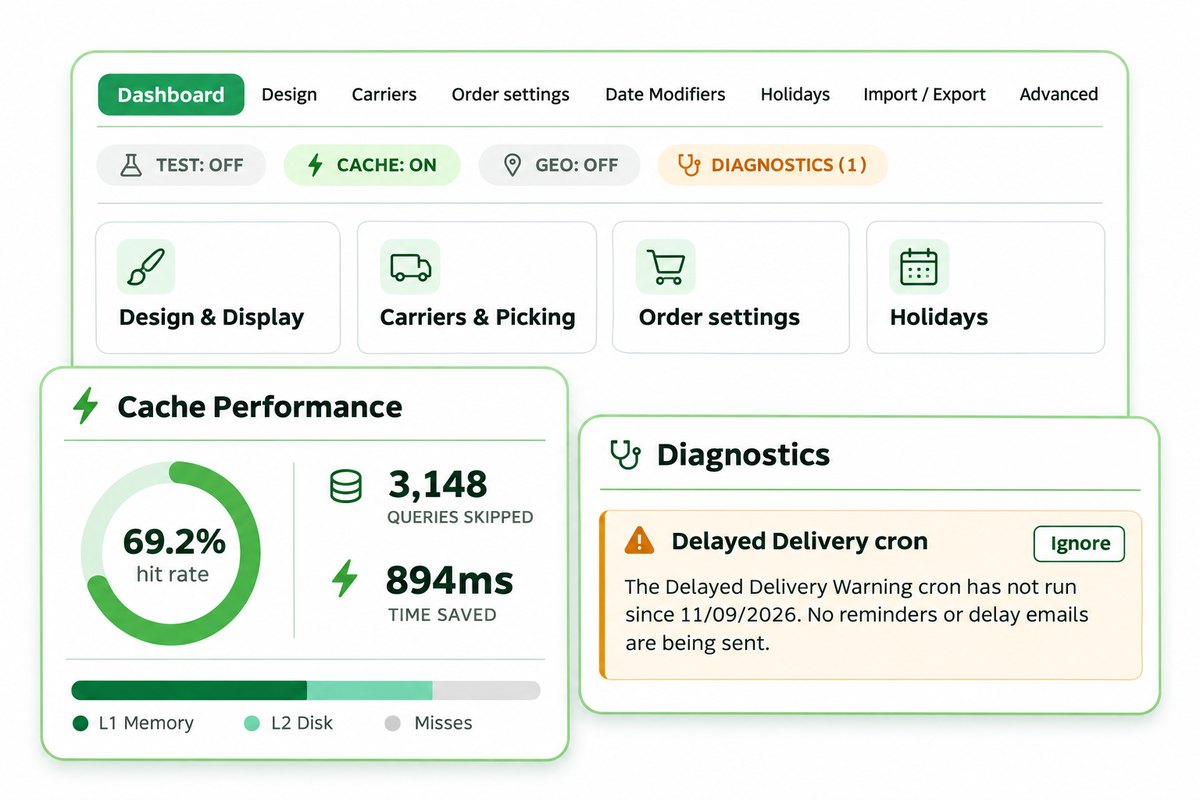
  • Two-layer cache: each date is calculated once and kept only while it is valid, until the next cut-off time, midnight, or four hours at most. Changing a setting refreshes it at once.
  • No waiting for geolocation: customers with an address are never geolocated. Visitors are located through your CDN's country information (CloudFlare, CloudFront, Akamai…) or a local country database installed from the back office, which answers in microseconds. Online services are only a fallback, with a limit of 600 ms in total.
  • Diagnostics: a badge warns you about a cron that has not run, missing hooks, or a cache or CDN that could serve old dates. Dismiss what does not apply to your shop.
  • Cache modules: detects the usual page-cache modules, and sets the dynamic hooks of ETS SuperSpeed in one click.

Everything under control

  • A dashboard with an 8-step setup checklist, shortcuts to every section and a status bar (test mode, cache, geolocation, diagnostics).
  • Hooks panel: turn the module's optional hooks on or off without touching code.
  • CSV import and export of extra days for products and combinations, by ID or reference.
  • JSON backup and restore of the whole configuration.
  • Test mode limited to your IP, and a debug mode with forced dates and forced IP addresses to check any day and any country.
  • Multistore: carriers, holidays and messages per shop; the delay warning runs per shop.

* Symbolic representation of the module screens, simplified for easier understanding.

For developers

Hooks and widget

Place the block anywhere with the module's hooks, the displayEstimatedDeliveryCalendar hook or the widget, and add PrettyBlocks blocks for the product and the cart.

Custom warehouses

Two hooks (actionEDGetWarehousesList, actionEDGetWarehouseQuantities) let another module supply its warehouses and their stock, so warehouse preparation days work beyond PrestaShop's Advanced Stock.

Compatibility

  • PrestaShop 1.6.1 to 9.2, PHP 7.1 or later. One installation adapts to each version.
  • Multistore and multilingual. Back office translated into 12 languages besides English.
  • Theme-friendly: works with the default themes, including Hummingbird, and lets you choose the exact position on any theme.
  • The Delayed Delivery Warning needs a cron job: the module gives you the URL.
  • The local country database needs PrestaShop 1.7 or later; on 1.6 the online services are used.

Installation

  • Upload the module to your PrestaShop and install it.
  • Open the Dashboard and follow the setup checklist.
  • Set up your carriers: delivery days, transit times and cut-off times.
  • Add your holidays and choose how the date looks in Design.

Frequently asked questions

Yes. Each carrier in your shop gets its own delivery days, transit times and cut-off times, and you can set different transit times per delivery zone.

You decide: add extra days, show a range, use the product's restock date, or show a message of your own. Pre-orders show their release date.

Yes. Write it per language with variables and conditions, or start from one of the 17 templates.

Dates are cached in two layers and refreshed only when something changes, and geolocation uses your CDN or a local database first. A diagnostics panel tells you if a cache could serve old dates.

It detects the usual cache modules and warns you when one could show an old date. For ETS SuperSpeed it sets the dynamic hooks in one click.

Yes. Ready-made variables put the dates in the order emails, and if an order runs late the customer receives one email about it.

No module can. The date is an estimate from your settings and your carriers' usual times; if a carrier is late, the delay warning helps you tell the customer first.

Yes. Carriers, holidays and messages are set per shop, from one installation.

Stop answering “when will it arrive?”. Show it.

One year of updates included.
Reviews
4.8
★ ★ ★ ★ ★
185 reviews
5 ★
155
4 ★
26
3 ★
1
2 ★
0
1 ★
3
Filter:
Charles N. Verified buyer PrestaShop Addons
06/06/2026
★ ★ ★ ★ ★

Excellent module. SAV formidable. Merci beaucoup. Charles. Zenvitre.fr

Was this helpful?
Mauro M. Verified buyer PrestaShop Addons
05/21/2026
★ ★ ★ ★ ★

Prodotto che soddisfa le mie esigenze

Was this helpful?
Antonio P. Verified buyer PrestaShop Addons
05/26/2025
★ ★ ★ ★ ★

Módulo con un buen soporte.

Was this helpful?
Stéphane B. Verified buyer PrestaShop Addons
01/26/2025
★ ★ ★ ★ ★

Un module très complet et facile à utiliser. Le développer est très réactif

Was this helpful?
Beldi z. Verified buyer PrestaShop Addons
09/02/2024
★ ★ ★ ★ ★

Vraiment satisfait du module. Il fonctionne très bien et le support est super efficace. Je le recommande !

Was this helpful?

Write your review

Estimated Delivery V3  for Prestashop

Estimated Delivery V3 for Prestashop

A must-have module. Let your customers know the estimated delivery in the product page, in the order process or even in the order emails.

Write your review